A new customer is created in the CRM, the order is entered into the ERP, invoice data is generated in the financial system, and the service department uses yet another tool. As long as employees are manually copying data or moving CSV files, the system landscape may appear digital, but the process itself is not.
Integrate CRM, ERP, and Data Without Interface Chaos
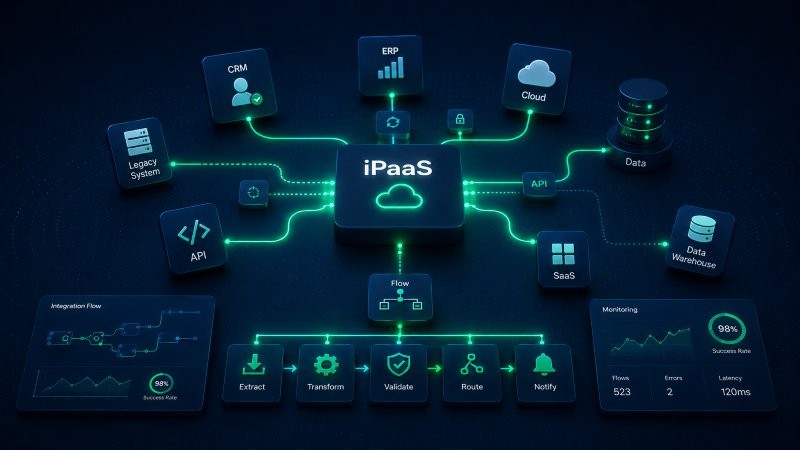
This is exactly where iPaaS comes in. An Integration Platform as a Service connects applications, data, and business processes via a central integration layer. Instead of building a separate point-to-point interface for each connection, data flows can be orchestrated, monitored, and expanded in a structured way.
This is particularly interesting for B2B companies when CRM integration, ERP integration, data integration, and process automation are all growing simultaneously. This article explains when iPaaS makes sense and how companies can build integration in a way that remains scalable.
In short: iPaaS acts as the connecting layer between systems. The platform ensures that data is not only transferred but is also available in the right system at the right time, in accordance with defined processes.
Why Traditional Interfaces Quickly Become Confusing
A single software integration is usually fairly straightforward to manage. Things get complicated when more and more applications need to communicate with one another. A few connections can quickly turn into a web of dependencies that is difficult to test and maintain when changes are made.
The terms “data integration” and “enterprise application integration” essentially describe the same challenge: data must flow reliably between different applications without each system having to manage its own integration logic.
ERP system integration and CRM integration, in particular, often involve critical master data and transaction data. Incorrect mappings, duplicate records, or delayed transfers then have a direct impact on sales, order processing, and service.
• Point-to-point interfaces become more complex with each additional application. • Errors are harder to trace when monitoring and logging are spread across multiple systems. • Changes to data fields or processes can affect multiple interfaces simultaneously. • Manual data imports prevent true end-to-end automation.
Typical B2B Use Cases for iPaaS
Integrating CRM and ERP
New accounts, contacts, quotes, and orders are synchronized between the CRM and ERP systems. Sales representatives can view relevant order information without having to switch between multiple systems.
Automate Lead-to-Cash
A qualified lead becomes an opportunity, a sales order is created, and then forwarded to the ERP system or billing. Process Integration links several process steps in this workflow.
Consolidate data from multiple sources
Data integration from forms, e-commerce, CRM, ERP, and service systems is standardized and made available for downstream processes.
Connecting EDI and Modern Cloud Applications
An EDI integration can connect traditional B2B data exchange processes with modern APIs or cloud applications.
Business Process Integration Across Departmental Boundaries
Approvals, onboarding, service, and procurement are handled across multiple systems. iPaaS orchestrates the data transfers and status information.
What an iPaaS platform actually does
A data integration platform provides core functions for connectors, data mapping, transformation, error handling, and orchestration. It does not necessarily replace all existing interfaces, but it does create a more consistent integration logic.
The term “Integration as a Service” describes this approach from an operational and cloud perspective. Companies subscribe to the integration platform as a service and can deploy new connections more quickly than if each connection were developed and operated individually.
Native integration and existing APIs also remain relevant. A good architecture does not dogmatically choose between native and iPaaS, but rather uses the connection that makes the most economic and technical sense for each use case.
How Companies Should Build an Integration Architecture
Before selecting integration software, companies should document their data flows. Which systems are the primary sources? Where is master data generated? Which data must be transferred in real time, and where is delayed synchronization sufficient?
In the next step, interfaces are prioritized based on criticality and process benefits. This helps avoid implementing integrations that are technically interesting but of little business relevance.
System integrators specializing in automation and managed cloud services can also be part of the operating model. It is crucial to establish a clear division of responsibilities for mapping, monitoring, security, release management, and troubleshooting.
1. Create a system and data map 2. Define leading systems and data ownership 3. Prioritize process-critical integrations 4. Define Interface and Security Standards 5. Plan for Monitoring and Error Handling 6. Expand the Architecture Step by Step
Classification of MPowerdHub
MPowerdHub does not view iPaaS in isolation as mere technical middleware. Business value is created when data integration and process automation are planned together.
Within the MPowerdHub ecosystem, CRM, integration, and automation technologies are combined to suit each specific process. For example, Creatio—as a CRM and process platform—and integration solutions such as Workato or Lobster can work together within a unified architecture.
The goal is a system landscape in which data flows reliably, processes remain traceable, and new integrations can be added without creating new interface chaos.
iPaaS brings order to systems and processes
iPaaS is particularly relevant when a growing system landscape can no longer be effectively managed using individual interfaces. A central integration layer reduces complexity and lays the foundation for end-to-end automation.
The crucial step here is not selecting a connector, but clearly defining data ownership, process logic, and integration architecture.
MPowerdHub helps companies connect CRM, ERP, data, and automation into a robust integration landscape.
FAQ – Frequently Asked Questions About Choosing a CRM
iPaaS stands for Integration Platform as a Service. The platform connects applications, data, and processes via a centrally managed integration layer.
A single interface typically connects two systems. iPaaS provides a common platform for numerous integrations, transformations, monitoring, and orchestration.
Yes. CRM and ERP integration are among the most common use cases, especially when customer, quote, order, and status data need to be exchanged.
No. Native integrations or existing APIs can still be useful. What matters most is a clean overall architecture.
MPowerdHub analyzes systems and data flows, prioritizes integrations, and supports architecture, implementation, automation, and operations.
30 minutes. No sales pitch. Just an open conversation about the challenges you face.
Your specialized B2B digital platform consultancy. CRM implementation, process automation, and digital transformation—with fixed prices and a team that delivers.